ERP / CAD Product Configurator
Compatibility descriptor engine ensuring wall, door, and panel combinations are valid before reaching a construction site — backed by live Odoo article data and IMOS CAD rules.
Role
Senior Frontend / Full Stack Engineer
Timeline
2023
Type
ERP
Visual Proof
Protected enterprise system. Screenshots and architecture are sanitized. Sensitive implementation details, credentials, and internal endpoints are omitted for security.
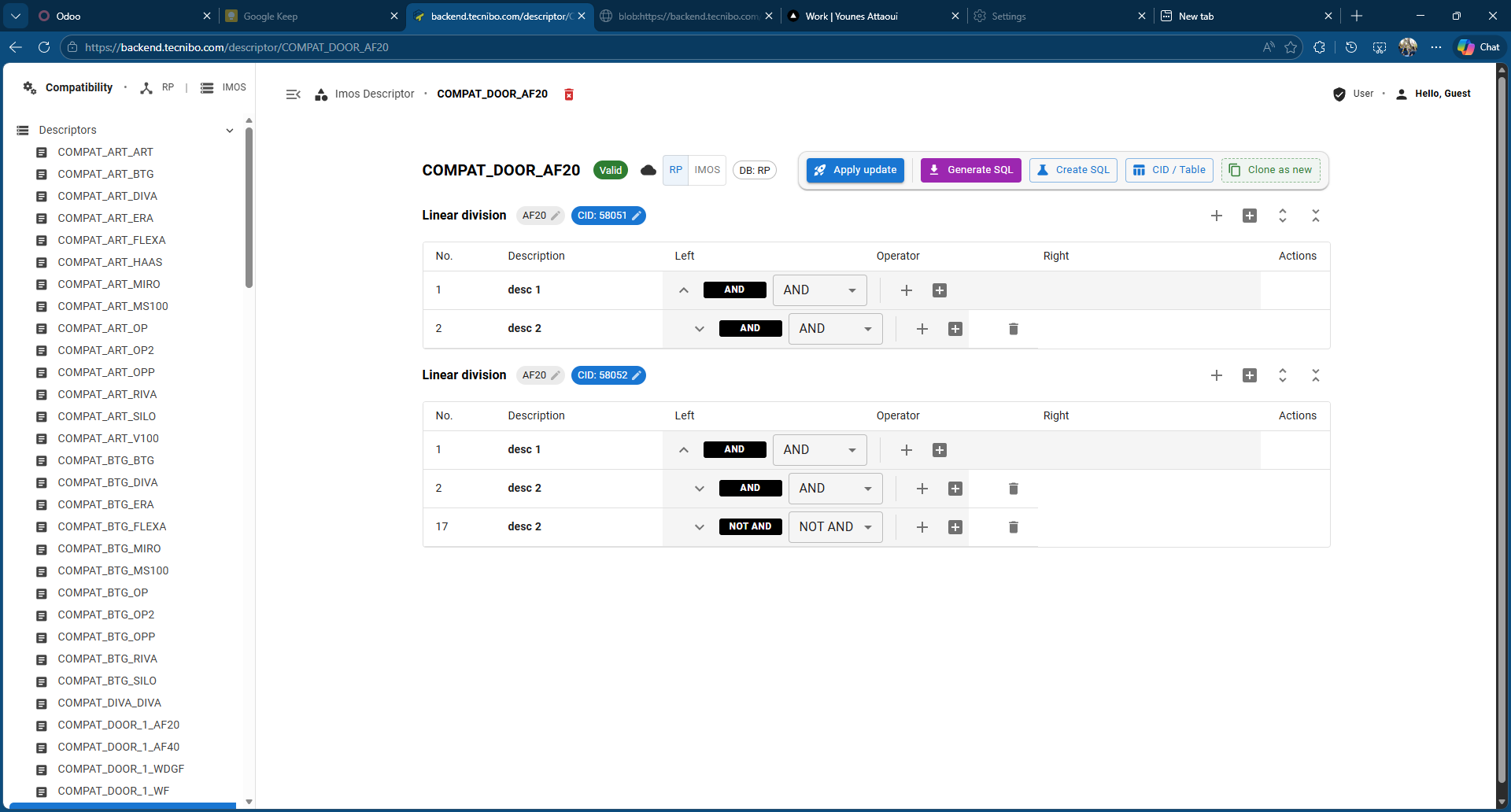
Compatibility Descriptor Editor
The rule editor where factory experts define AND/NOT AND compatibility trees for wall and panel combinations.
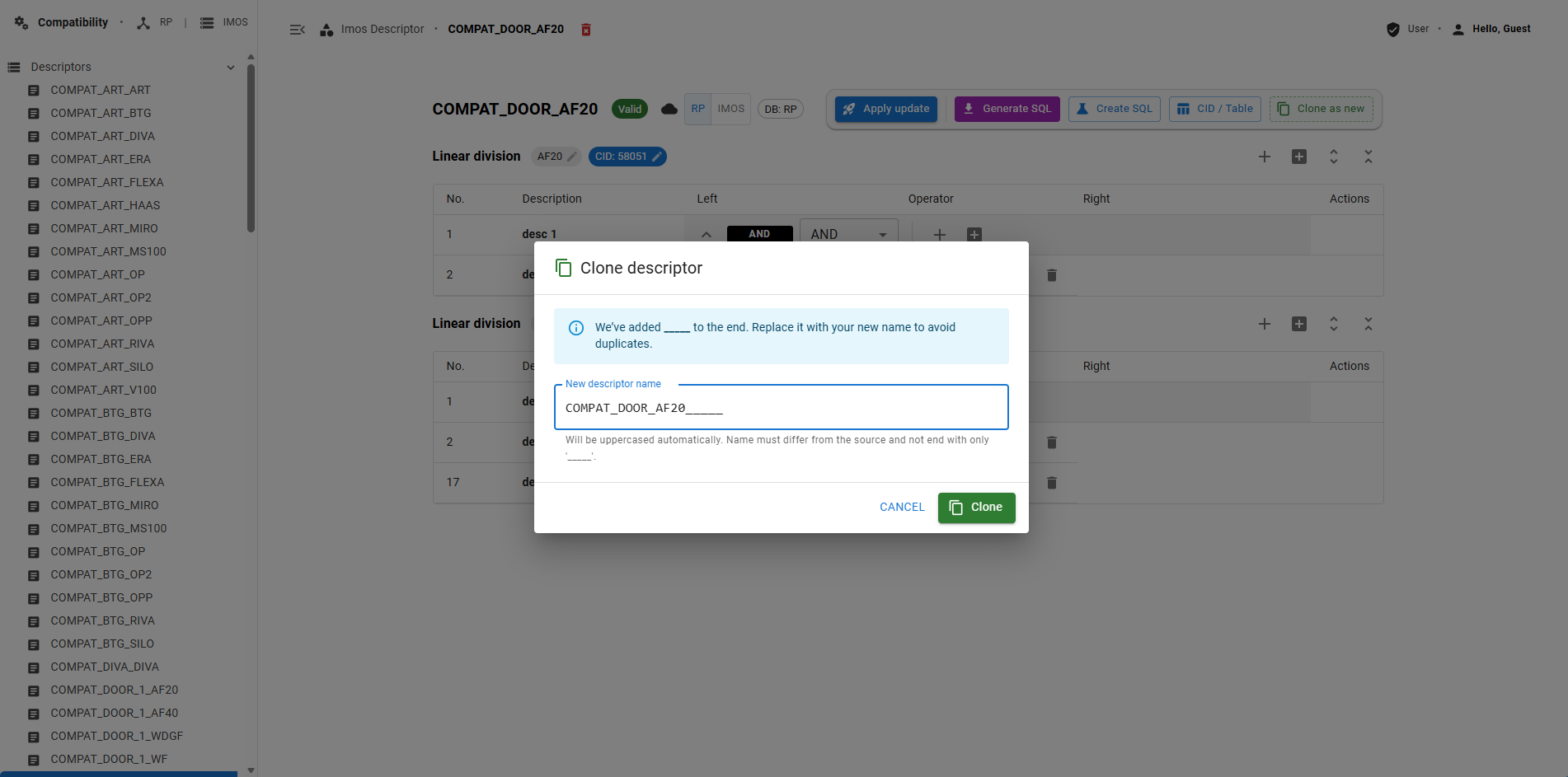
Compatibility Descriptor Clone
Clone workflow for rapidly creating new compatibility rule sets from existing validated descriptors.
Configurator UI
Protected enterprise system — screenshot sanitized for security.
Condition Tree Visualization
Protected enterprise system — screenshot sanitized for security.
Architecture Diagram
Protected enterprise system — screenshot sanitized for security.
Problem & Solution
A Millimeter Error on a Construction Site Costs Thousands
A furniture and interior panel manufacturer installs custom wall systems, doors, and fixtures on construction sites (chantiers) across the region. Every installation order is composed of panels, doors, frames, and accessories that must be dimensionally and structurally compatible — not just visually. A wrong article combination sent to an installation team means mis-drilled walls, panels that don't fit the frame, doors that can't swing, and the entire crew standing idle while the factory re-orders. The cost of a single compatibility error on site runs into thousands of euros. The factory used IMOS — an industry-specific CAD/ERP system — as the source of truth for articles and dimensions, but had no web interface to enforce compatibility rules before an order shipped. Backoffice engineers and factory experts were cross-referencing printed spreadsheets, catching errors only after production.
- No compatibility check before an order reached the production floor — errors only discovered on site
- Installation teams on construction sites had no way to verify component compatibility before drilling
- Factory article data lived in IMOS and Odoo — no single interface connected both sources for pre-order validation
- Rules were encoded in the heads of factory experts, not in a system — impossible to enforce at scale
- A single order spans 8+ normalized ERP tables — partial saves left configurations in inconsistent states
- Two backoffice agents editing the same order simultaneously could silently overwrite each other
Compatibility Descriptor Engine with Live Odoo Article Fetching
A backoffice system where factory experts define wall and panel compatibility rules using a visual descriptor editor — AND/NOT AND condition trees per article type (COMPAT_DOOR, COMPAT_ART, COMPAT_BTG, etc.). The backend engine fetches real-time article data from Odoo, runs all compatibility calculations server-side, and — critically — suggests the most compact valid combination automatically. It doesn't just reject bad configurations; it proposes the right one. What appears to users is a clean data-entry interface; what runs behind it is an intelligent rule engine that makes installation errors on construction sites structurally impossible.
- Intelligent suggestion engine: automatically proposes the most compact valid article combination, not just validates
- Visual descriptor editor: factory experts define AND/NOT AND compatibility rules per article family
- Backend compatibility engine: all calculations server-side using live Odoo article data at validation time
- Real-time Odoo RPC integration: article dimensions, families, and constraints fetched live
- IMOS descriptor sync: rule descriptors map to IMOS CAD article codes for factory production alignment
- Recursive condition trees evaluated via topological sort — 40+ field dependencies resolved in under 10ms
- Atomic multi-table persistence: a configuration write spans 8+ ERP tables in a single transaction
- Clone descriptor workflow: factory experts duplicate and modify existing rule sets safely
- Micro-frontend embedded inside Odoo: zero style leakage, correct lifecycle, native UX feel
Architecture
The application has three distinct layers: the Odoo host which injects the micro-frontend bundle, the React application which runs entirely client-side with Redux state, and the NestJS API which handles rule tree delivery, configuration persistence, and Odoo ERP synchronization. The key architectural constraint was zero Odoo dependency inside the React layer — communication flows only through a narrow JS API bridge.
- 1
User opens Odoo sale order → QWeb template detects product type → injects React bundle mount point
- 2
Odoo widget initializes React app, passes order ID and product ID through the JS API bridge
- 3
React app fetches the product rule tree from NestJS: a flattened dependency graph of all fields
- 4
Dependency graph is topologically sorted — evaluation order computed once on load
- 5
User selects option → rule resolver evaluates dependent fields in topological order → Redux state updated
- 6
Fields with no valid options in current state are hidden; required fields with one option are auto-selected
- 7
User confirms configuration → NestJS config transaction service opens a DB transaction
- 8
Transaction writes to all 8+ normalized tables (options, BoM entries, routing, price rules) atomically
- 9
On transaction success: Odoo RPC call updates the sale order lines and BoM in Odoo backend
- 10
Conflict: if another agent's save lands first, current agent receives a conflict notification via WebSocket
Technical Challenges
Recursive Condition Trees with Field-Level Dependencies
Why it was hard
Product rules are deeply nested: field A's visible options depend on field B's value, which depends on field C's value, which in turn may conditionally depend on field A. Evaluating these in the wrong order produces incorrect UI state. Evaluating them naively (re-evaluate all fields on every change) becomes exponentially expensive as rule complexity grows.
How I solved it
The backend serializes the rule tree as a flattened directed acyclic graph. On first load, the frontend runs a topological sort to determine the evaluation order. On each user selection, only the downstream subgraph of the changed field is re-evaluated, in topological order. Circular dependencies are caught during the sort (Kahn's algorithm) — if a cycle is detected at runtime, a clear error is thrown rather than an infinite loop.
Result
Correct field evaluation for all tested product configurations, including products with 40+ dependent fields. Re-evaluation time stays under 10ms for the largest rule trees in the catalog.
Persisting Configuration Across 8+ Normalized ERP Tables
Why it was hard
The IMOS/ERP schema is highly normalized. A single product configuration — material choice, dimension, accessory set, finish — maps to writes across option tables, BoM entries, routing steps, price rule records, and order line items. If any write fails partway through, the configuration is left in an inconsistent state that is difficult to detect and correct.
How I solved it
Introduced a NestJS 'configuration transaction service' that accepts a single configuration snapshot and orchestrates all table writes inside one PostgreSQL transaction. The service has a deterministic write order (foreign key constraints define the sequence). Any failure rolls back all writes. The API returns either a fully committed confirmation or a structured error — never a partial state.
Result
Configuration integrity guaranteed at the database level. The rollback path was exercised and tested against simulated constraint violations.
Embedding React Inside Odoo Without Framework Conflict
Why it was hard
Odoo's Owl.js frontend uses its own virtual DOM and event system. Injecting a React app into an Odoo view risks CSS bleeding, event listener conflicts, and double-rendering if React and Owl both try to own the same DOM subtree. Odoo also controls the JavaScript module loading pipeline.
How I solved it
The React app is built as a self-contained ES module with a well-defined mount/unmount API. All CSS is scoped via CSS Modules with a unique prefix to prevent class name collisions. The Odoo widget creates an isolated DOM container, mounts the React app into it on widget initialization, and calls the unmount API on widget destruction. React and Owl operate on entirely separate DOM subtrees — they never share state.
Result
Zero style leakage. React lifecycle works correctly with Odoo's widget lifecycle. The configurator is visually indistinguishable from a native Odoo view.
Cycle Detection in Rule Tree Import
Why it was hard
Product managers who configure rules in the admin interface can accidentally create circular dependencies: rule A requires field B, rule B requires field C, rule C requires field A. Without detection, this would cause an infinite evaluation loop in the frontend — a silent failure that corrupts the UI state without a clear error.
How I solved it
Cycle detection runs on the backend during rule set import, before the rules are committed to the database. The validator runs a depth-first search on the rule graph. Any detected cycle surfaces a structured error to the admin UI: which field chain creates the cycle, allowing the product manager to correct it before it affects production.
Result
Impossible to deploy a circular rule set to production. Product managers receive actionable error messages identifying the specific conflicting fields.
Key Engineering Decisions
Redux Toolkit over React Context for configuration state
Why
A configuration form with 40+ dependent fields creates significant re-render pressure if managed with Context. RTK's normalized state with memoized selectors ensures that selecting field A does not re-render the components bound to fields B through Z. The devtools were also essential for debugging rule evaluation order during development.
Alternative considered
React Context with useReducer is sufficient for small configurators. At 40+ fields with complex cross-dependencies, the lack of memoization creates visible UI lag.
Micro-frontend over iFrame for Odoo embedding
Why
iFrames are the safe, isolated option — but they break Odoo's native modal system, keyboard shortcut handling, and session context. Odoo's print dialogs, keyboard navigation, and context menus need DOM access that iFrames block. The scoped CSS approach achieves similar style isolation without the UX cost.
Alternative considered
An iFrame would be correct if the configurator needed to run on a completely different origin. Inside the same Odoo instance on the same domain, the micro-frontend approach gives better UX with acceptable isolation.
Configuration transaction service as a dedicated NestJS layer
Why
The multi-table write pattern recurs across every configuration save. Pushing it into individual controllers would scatter the write logic and make atomic rollback impossible to reason about. The transaction service is the single place where 'what a configuration save means at the database level' is defined — testable in isolation.
Alternative considered
Individual controller methods writing their own tables works for simple CRUD. For a write pattern that spans 8 tables with foreign key ordering constraints, the service layer is necessary.
Impact
Eliminated configuration errors from manual rule cross-referencing
Sales staff and backoffice teams previously cross-referenced printed spreadsheets to determine valid combinations. The configurator enforces these rules in the UI — invalid combinations simply cannot be selected.
Non-technical staff can configure complex products
Product configuration that previously required a developer or specialist to navigate the ERP schema is now done through a guided UI by any trained sales agent.
Backoffice team can view and modify configurations in Odoo
Because the configurator writes directly to the Odoo-compatible schema and syncs via RPC, backoffice users see configurations inside their existing Odoo workflows — no new system to learn.
New product lines added without code changes
The rule engine is entirely data-driven. Product managers can configure new product families, with their own field sets and dependency trees, through the admin interface — no developer involvement.
What I Would Improve Next
These aren't speculative features — they're the gaps I identified while building and operating the system.
Visual rule tree editor
A drag-and-drop interface for building condition trees, replacing the current structured form-based admin UI. Would reduce rule configuration errors by making the dependency graph visually obvious.
Configuration versioning and history
Ability to save, name, and restore historical configuration states on an order. Critical for long sales cycles where a configuration is revisited weeks later.
Real-time collaborative editing
Currently, concurrent edits show a conflict notification after the second save. Operational transformation or CRDT-based real-time sync would allow two agents to work on the same configuration simultaneously.
Lazy-loading for large product catalogs
The current implementation loads the full rule tree on mount. For products with 100+ field groups, progressive loading of field sections as the user navigates would improve initial load time.
Automated rule conflict detection
Beyond cycle detection, proactively identifying rule combinations that produce unreachable states (a required field whose only valid options are all excluded by other rules) would catch deeper configuration errors.
Interested?
Let's talk about what I can build for you.
Open to senior full-stack roles, founding engineer positions, and contract engagements. Remote only.